

Introduction
Part One just covered some theory. Since 2011, a huge share of what Project Systems delivers through SAP’s Customer Engagement Initiative ships dormant, waiting behind a single BAdI, PS_FUNCTION_SWITCH, and a companion structure, PSSWITCH_FUNCTIONS. What started from a single note and 5 switches has quietly grown to 36 switches across 114 OSS notes. Reading about a decade-old dormant switch is one thing. Watching one actually get flipped is another — so this is that post.
This will be a hands-on demonstration of how to activate one of the switches. Nearly all of this process is just creating a BAdI implementation – something that is surely easily searchable online but I can’t help but provide the simple steps required to fully paint the picture of how this is handled. It’s not hard.
.
The Structure Itself
First, let’s look at the available switches in the system.

.
That’s the full list, as of this writing: 39 fields, each one a hidden feature waiting for someone to set it to ‘X’. You’ll notice that all of them (except XXL_LONG_SHORTTEXT_FLG) are a single character long. Remember, these are just individual indicators or flags. The detailed code is elsewhere and is only utilized once one of these flags is set to On. Only then will the delivered functionality be available. A handful of these we’ll walk through below; the rest are yours to go explore.
.
Step-by-step: Implementing Three Switches for CN60
The example for this walkthrough is CN60 (and its variant, CNS60), the Project System change documents report. CN60 is one of the most frequently used transactions in PS because it shows every change made to the project structure, captured as individual change documents. However, as delivered by SAP, it’s missing more than you’d expect. For this walkthrough, we’ll activate three switches at once, all of which touch CN60 directly:
- STATUS_CHANGES_FLG (SAP Note 2311926, “CC2 – D8662: Status changes in CN60,” released June 21, 2016) — This adds status changes (i.e., system and user status) to the change documents overview.
- LAYOUT_FIELD_FLG (SAP Note 2634440) — This adds an ALV layout option to the CN60 selection screen.
- ENHANCED_CN60_FLG (SAP Note 2970270, “Several Enhancements to CNS60/CN60 transaction,” released November 18, 2020) — This is a broader note that adds a series of change-document tracking to project definition dates, activity fields, milestones, relationships, and material components, plus insert/delete tracking. Pull up the note to see a more detailed list.
One prerequisite: note 2229946 (the note that first added a batch of fields to PSSWITCH_FUNCTIONS back in 2015) needs to already be implemented, since that’s what put STATUS_CHANGES_FLG into the structure in the first place.
.
- Create or confirm the BAdI implementation.
If you already built an implementation of PS_FUNCTION_SWITCH for an earlier switch, you don’t need a new one — every switch lives inside the same BAdI implementation. But, if this is your first go at it, go to [SE18]. From the initial screen, specify either enhancement spot ES_PS_BADI or BAdI PS_FUNCTION_SWITCH. Either one will do and take you to the same screen after pressing [Display].

.
While still on the initial [SE18], go to the menu path [Enhancement Implementation > Create] and walk through the following prompts to create the implementation. Once it’s complete, you can come back and use the menu path [Enhancement Implementation > Overview] or [ > Change] to pull up the implementation. This is also the way I use to see if a BAdI has ever been implemented or not. When you use the [Create] option, you’ll get two prompts to create the BAdI Implementation and the related Enhancement Implementation.


.
- Set all three flags in method GET_SWITCH.
Once the implementation has been created, navigate to the tab below. You’ll see there are two methods but we’re only concerned with GET_SWITCH.

.
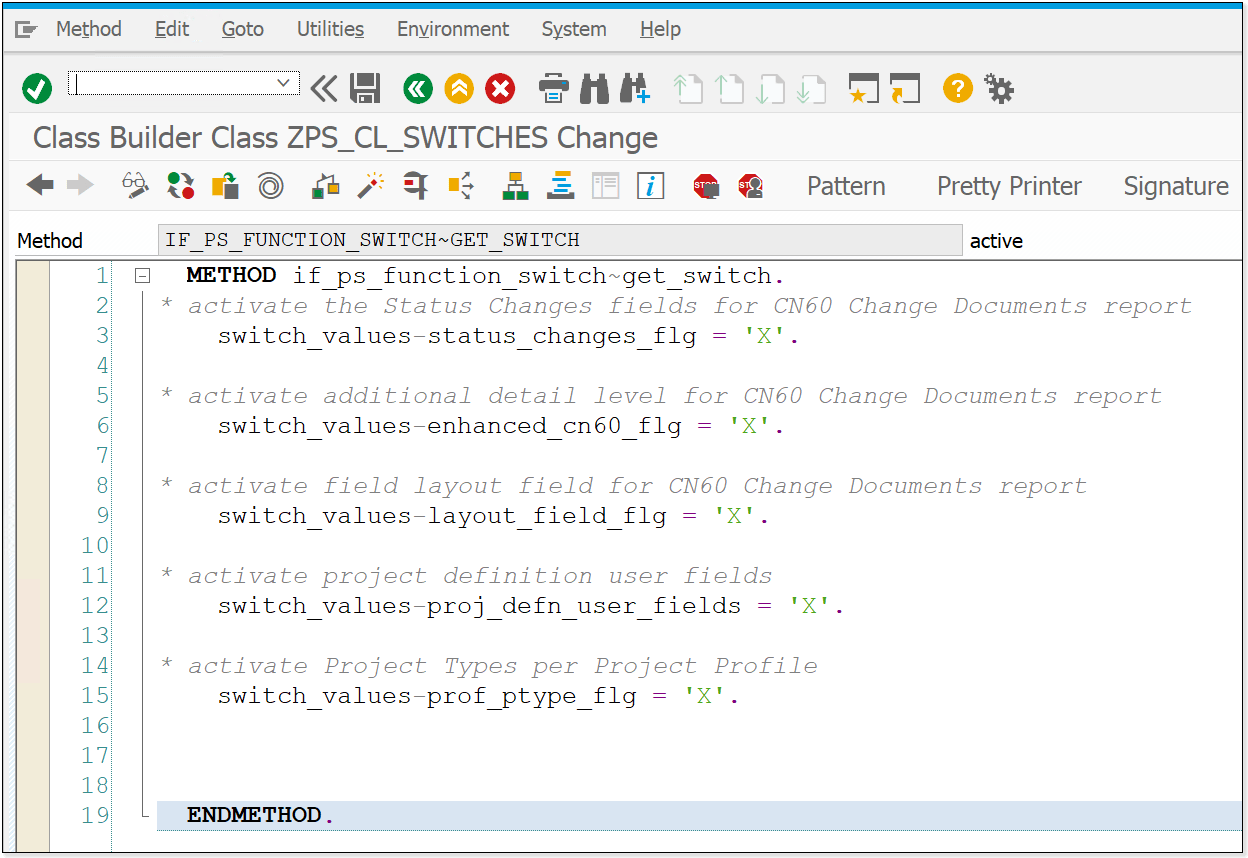
If you double-click on the GET_SWITCH method, you’ll see the ABAP editor where you can set the following three flags:
SWITCH_VALUES-STATUS_CHANGES_FLG = 'X'.
SWITCH_VALUES-LAYOUT_FIELD_FLG   = 'X'.
SWITCH_VALUES-ENHANCED_CN60_FLG  = 'X'.
.
- Review the text symbols and selection texts.
For this specific change, I’d recommend going to [SE38] for program RCNCHANGEDOC to review the below text symbols and selection texts that are used by the STATUS_CHANGES_FLG note. These should already be in place once you’ve implemented the note’s correction instructions — but it’s worth confirming both landed correctly before you assume the checkboxes are properly labeled:


.
- See it in action.
How does it look? First, here is the standard CN60 selection screen before the changes.

.
And here is how it looks after the changes.

.
That’s the whole cycle: one BAdI, three flags, a couple of items worth reviewing, and a transaction that suddenly does a lot more than it did an hour ago.
.
More Switches in Action
My code above activated a few other switches. Let’s look at one more.
.
PROF_PTYPE_FLG
This was the one from the SCN post mentioned in the previous blog. The IMG activity below looks like a normal tame step to execute.

.
And the IMG Documentation on this step makes no mention of the BAdI at all. Again, this looks like your average no-big-deal configuration item.

.
Below is where the project types can be limited/specified per project profile. In the system I’m working in, the project will use profile CAP.

.
Without the PROF_PTYPE_FLG active, the full list of project types will show up on the WBS regardless of how the above IMG activity was specified.

.
But with the flag active, the list of available project types is correctly limited based on the configuration step above.

.
What do I think?
Honestly? I’m impressed, and a little annoyed. Impressed because SAP keeps iterating on Project Systems and actually listening to what customers ask for — that’s the CEI program working exactly as intended, one narrow, unglamorous fix at a time. Annoyed because of how it’s delivered. Why a BAdI at all? The FI team solved this same problem years ago with FIN_FLAGS: a dedicated GUI, proper module organization, transport support, change documents, documentation, even a link to the specific OSS Note — the works. PS could have had all of that too. Instead, every new switch means another line inside GET_SWITCH, another change nobody outside PS tracks in any structured way. I suspect there’s a way to deliver this without an enhancement implementation at all — SAP already built exactly that pattern once — but until PS makes the jump, I’ll keep watching OSS for whatever flag shows up next.
.
References
- 2311926 – CC2 – D8662: Status changes in CN60 | Component: PS-IS-LOG | Released: June 21, 2016
- 2634440 – CustConn PS 2018: PSSWITCH_FUNCTIONS | Component: PS | Released: April 20, 2018
- 2970270 – Several Enhancements to CNS60/CN60 transaction | Component: PS-IS | Released: November 18, 2020
- 2229946 – CustConn PS II Wave 1: PSSWITCH_FUNCTIONS | Component: PS-ST | Released: November 23, 2015
- 2232730 – CustConn PS: Project profile specific project types to be shown | Component: PS-ST | Released: February 13, 2019


